Guest Orders for Magento 2
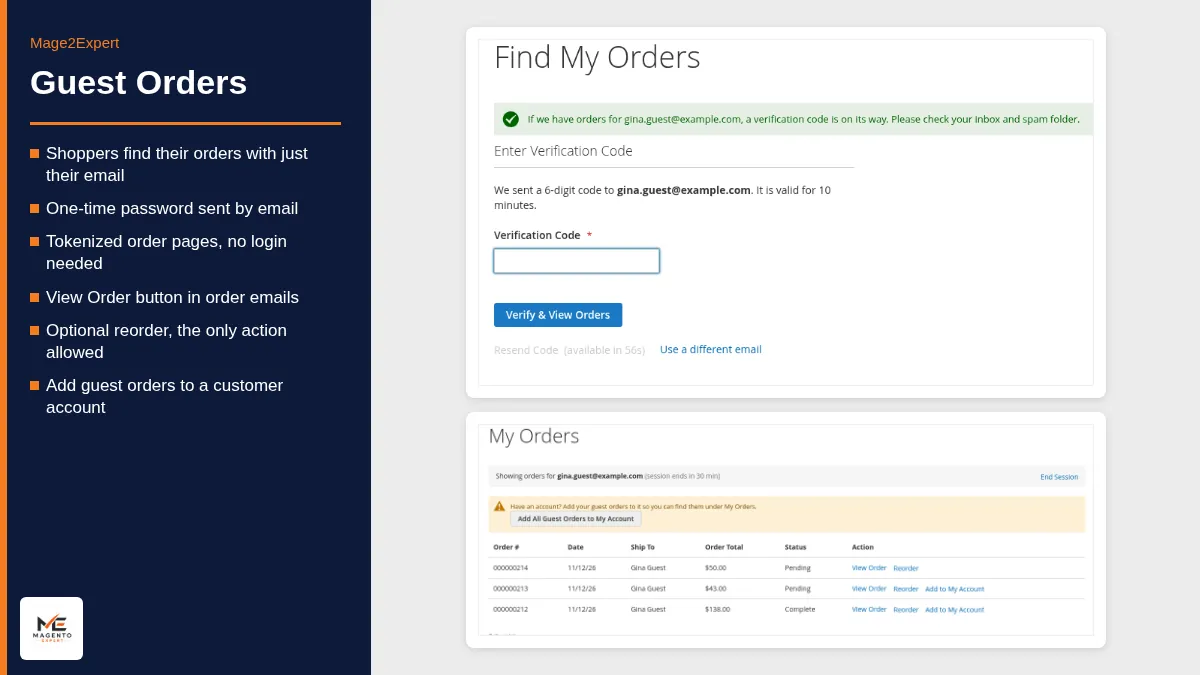
Guests find, view and reorder their orders with just their email and a one-time code, on private, tokenized order pages.
Why choose Guest Orders?
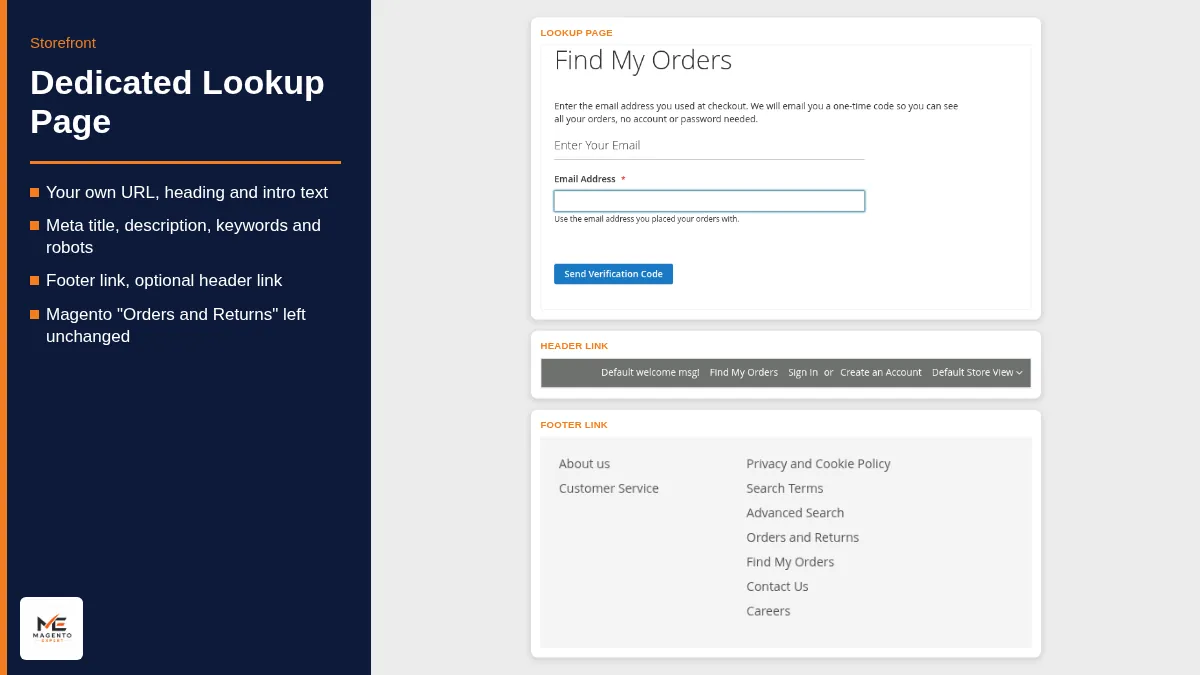
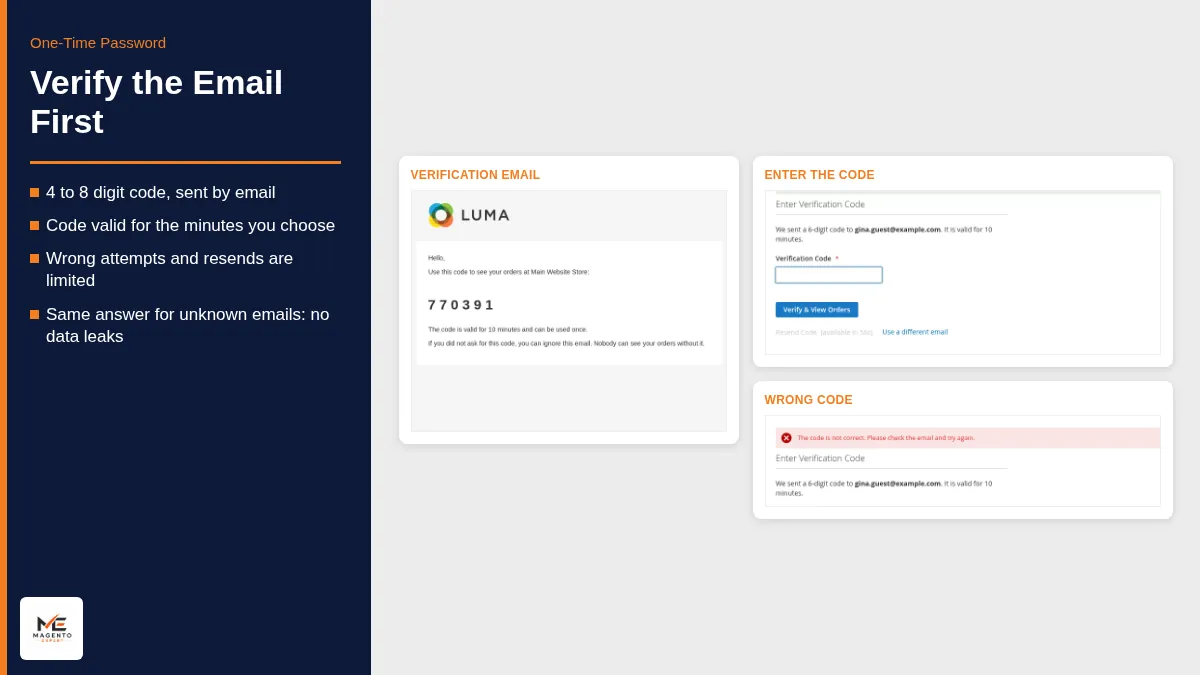
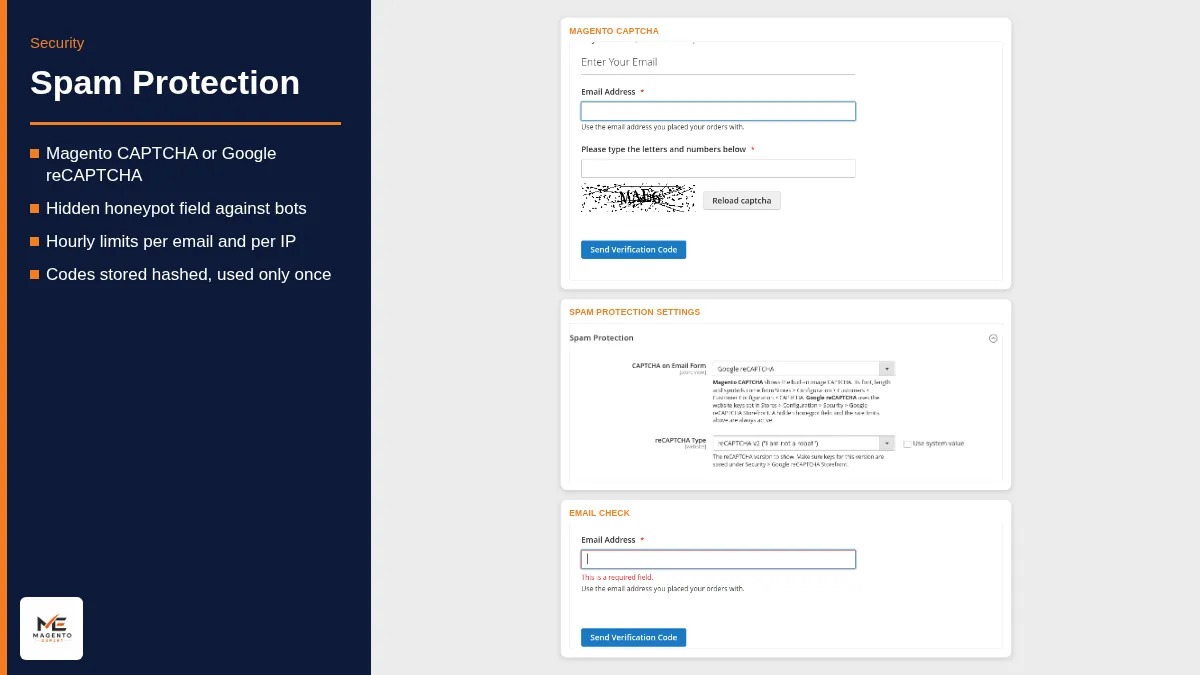
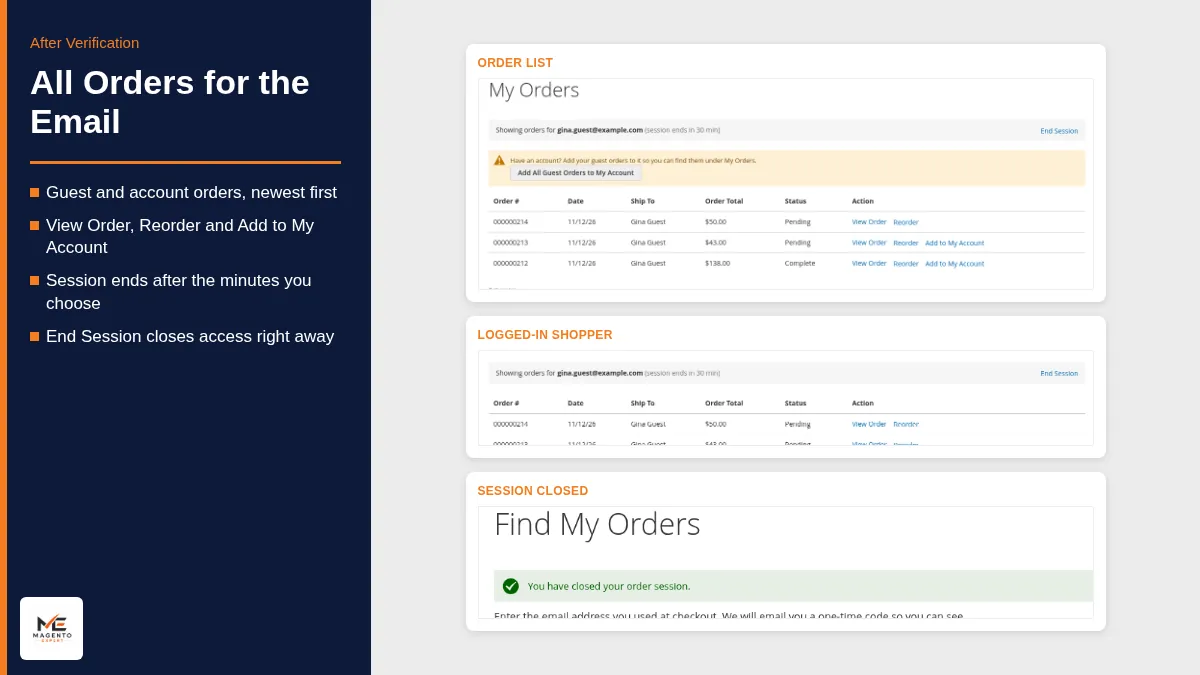
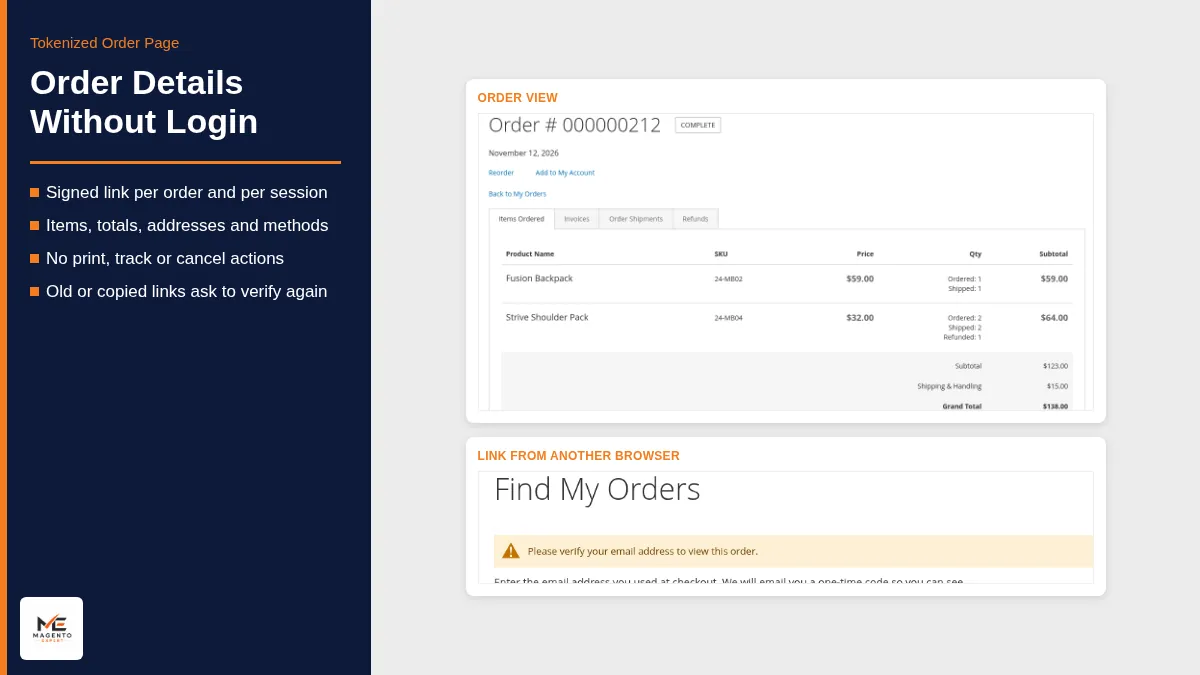
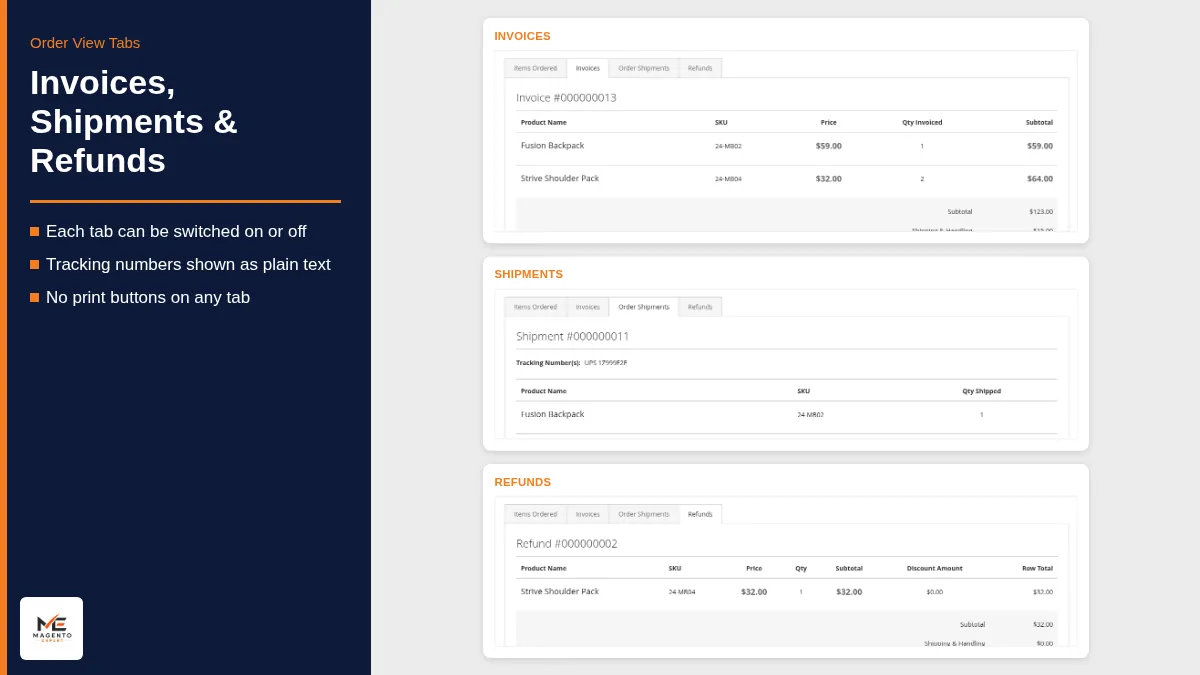
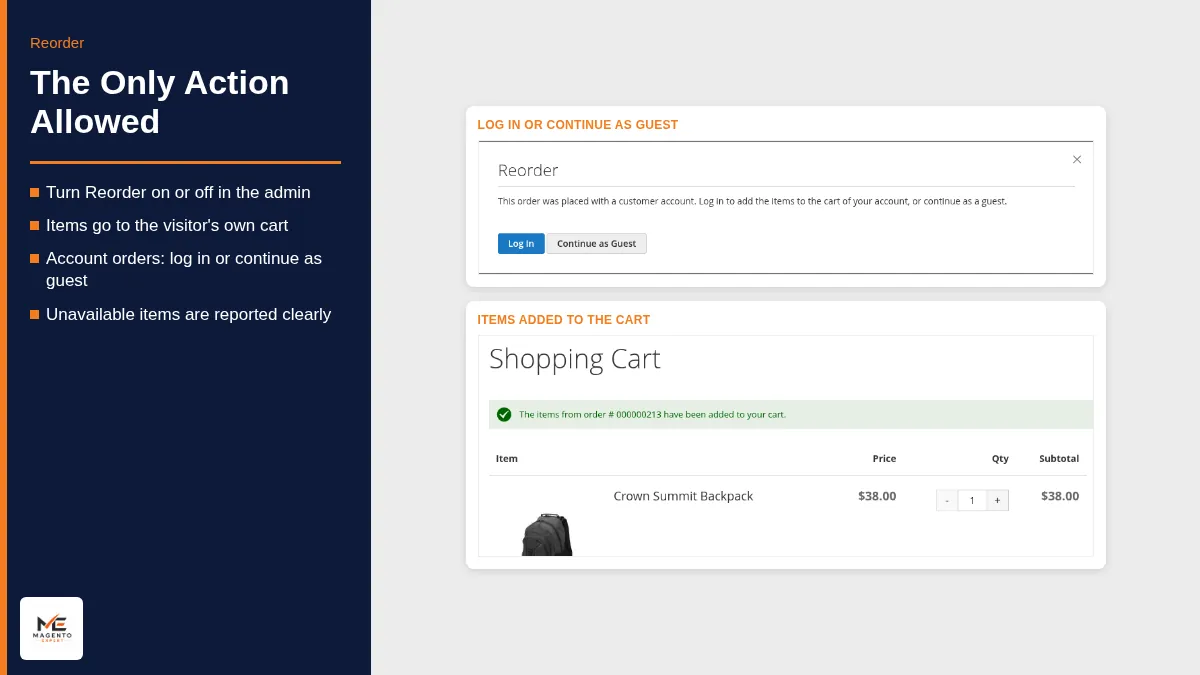
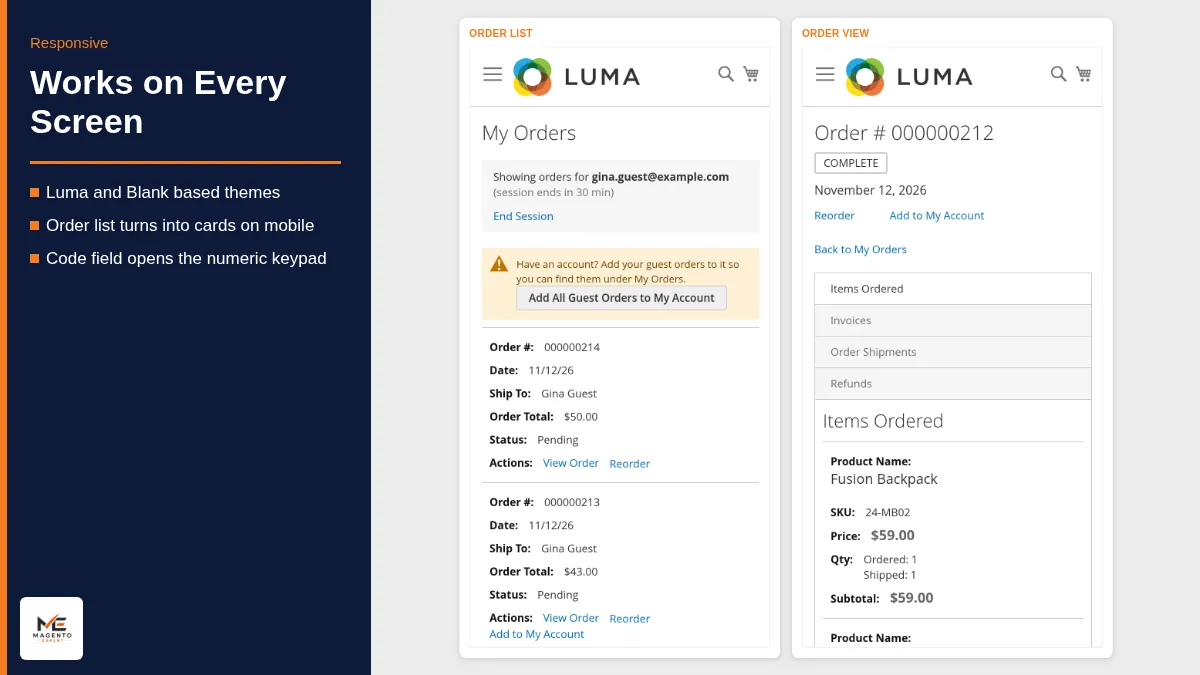
Magento's default Orders and Returns form asks guests for an order number, billing last name and postcode they rarely remember. Guest Orders replaces it with a lookup page where the shopper enters only their email address, receives a one-time code, and then sees every order placed with that email. Each order opens on a signed, tokenized page with items, totals, addresses and optional invoice, shipment and refund tabs, and the only action allowed is Reorder. Code lifetimes, attempt limits and hourly rate limits keep it secure, and unknown email addresses get the same response, so the form never reveals who your customers are.
Key features
- Email one-time code lookup
- Custom lookup page URL
- All orders for an email
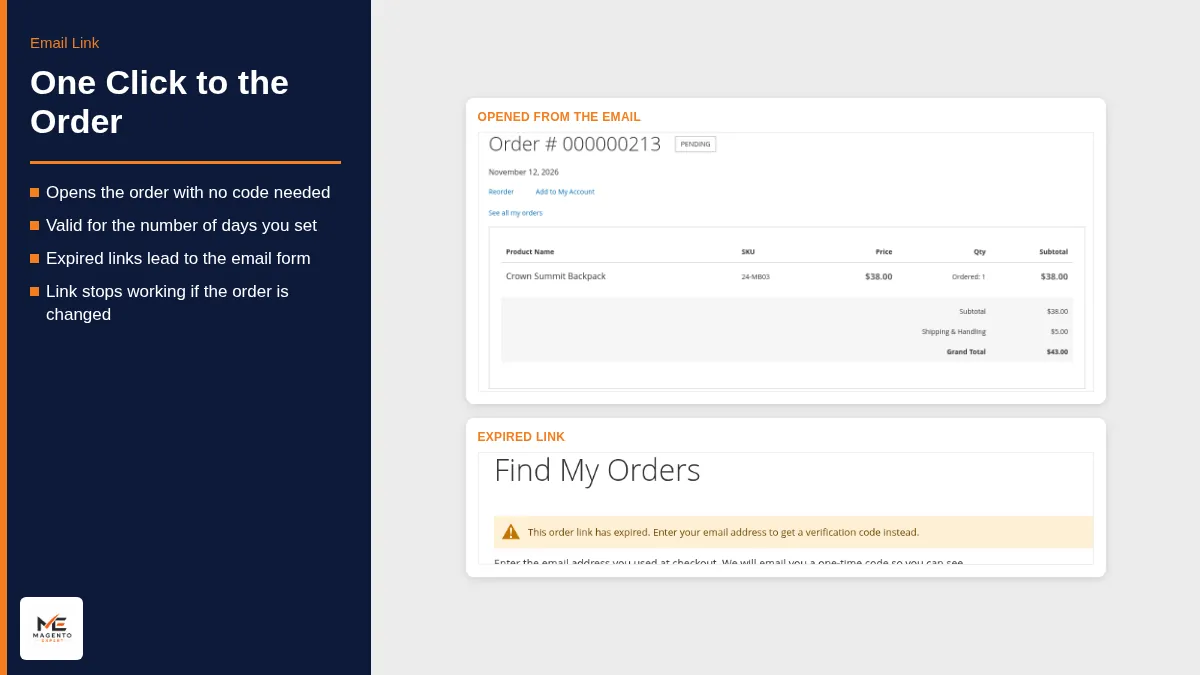
- Tokenized order pages
- Invoices, shipments and refunds
- Reorder
- Hourly rate limits
- Privacy-safe responses
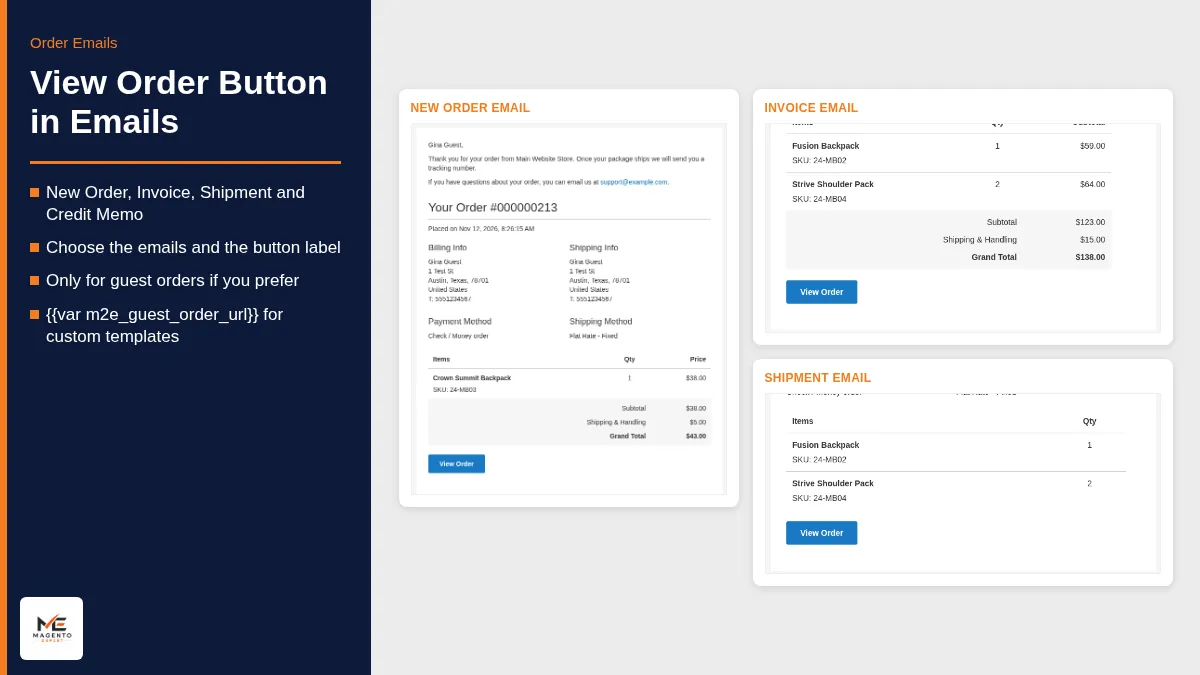
- View-order links in emails
- SEO and meta settings
At a glance
| Module name | Mage2Expert_GuestOrders |
|---|---|
| Composer package | mage2expert/module-guest-orders |
| Settings | Stores › Configuration › Magento Expert › Guest Orders (36 options) |
| Per store view settings | Yes |
| API | No custom endpoints (uses Magento's standard APIs) |
| Scheduled jobs | 1 cron job |
| PHP | 8.1, 8.2, 8.3, 8.4, 8.5 |
Installation
After purchasing on the Adobe Commerce Marketplace, install it with Composer using your Marketplace access keys:
composer require mage2expert/module-guest-orders
bin/magento module:enable Mage2Expert_GuestOrders
bin/magento setup:upgrade
bin/magento setup:di:compile
bin/magento setup:static-content:deploy -f
bin/magento cache:flush
Skip setup:di:compile and static-content:deploy if your store runs in developer mode.
Configuration reference
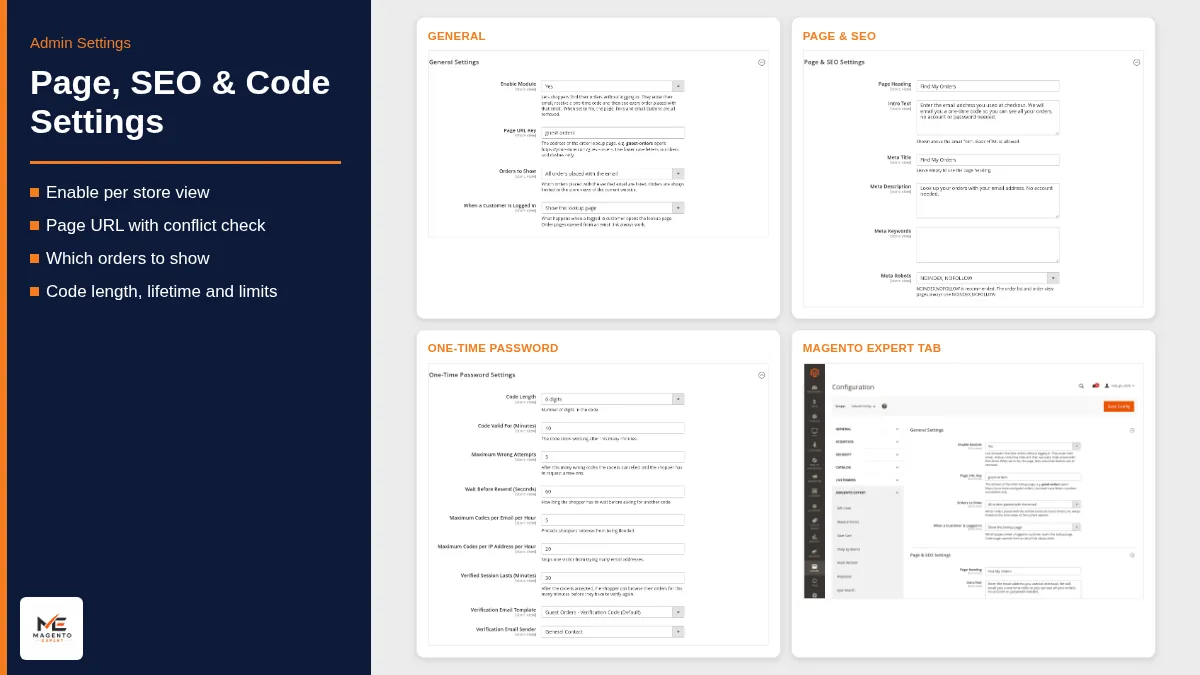
All 36 options under Stores › Configuration › Magento Expert › Guest Orders, grouped as they appear in the admin.
General Settings 4
| Setting | Description |
|---|---|
| Enable Module | Lets shoppers find their orders without logging in. They enter their email, receive a one-time code and then see every order placed with that email. When set to No, the page, links and email buttons are all removed. |
| Page URL Key | The address of the order lookup page, e.g. guest-orders opens https://your-store.com/guest-orders. Use lower case letters, numbers and dashes only. |
| Orders to Show | Which orders placed with the verified email are listed. Orders are always limited to the store views of the current website. |
| When a Customer Is Logged In | What happens when a logged-in customer opens the lookup page. Order pages opened from an email link always work. |
Page & SEO Settings 6
| Setting | Description |
|---|---|
| Page Heading | |
| Intro Text | Shown above the email form. Basic HTML is allowed. |
| Meta Title | Leave empty to use the page heading. |
| Meta Description | |
| Meta Keywords | |
| Meta Robots | NOINDEX,NOFOLLOW is recommended. The order list and order view pages always use NOINDEX,NOFOLLOW. |
One-Time Password Settings 9
| Setting | Description |
|---|---|
| Code Length | Number of digits in the code. |
| Code Valid For (Minutes) | The code stops working after this many minutes. |
| Maximum Wrong Attempts | After this many wrong codes the code is cancelled and the shopper has to request a new one. |
| Wait Before Resend (Seconds) | How long the shopper has to wait before asking for another code. |
| Maximum Codes per Email per Hour | Protects shoppers' inboxes from being flooded. |
| Maximum Codes per IP Address per Hour | Stops one visitor from trying many email addresses. |
| Verified Session Lasts (Minutes) | After the code is accepted, the shopper can browse their orders for this many minutes before they have to verify again. |
| Verification Email Template | |
| Verification Email Sender |
Spam Protection 2
| Setting | Description |
|---|---|
| CAPTCHA on Email Form | Magento CAPTCHA shows the built-in image CAPTCHA. Its font, length and symbols come from Stores > Configuration > Customers > Customer Configuration > CAPTCHA. Google reCAPTCHA uses the website keys set in Stores > Configuration > Security |
| reCAPTCHA Type | The reCAPTCHA version to show. Make sure keys for this version are saved under Security > Google reCAPTCHA Storefront. |
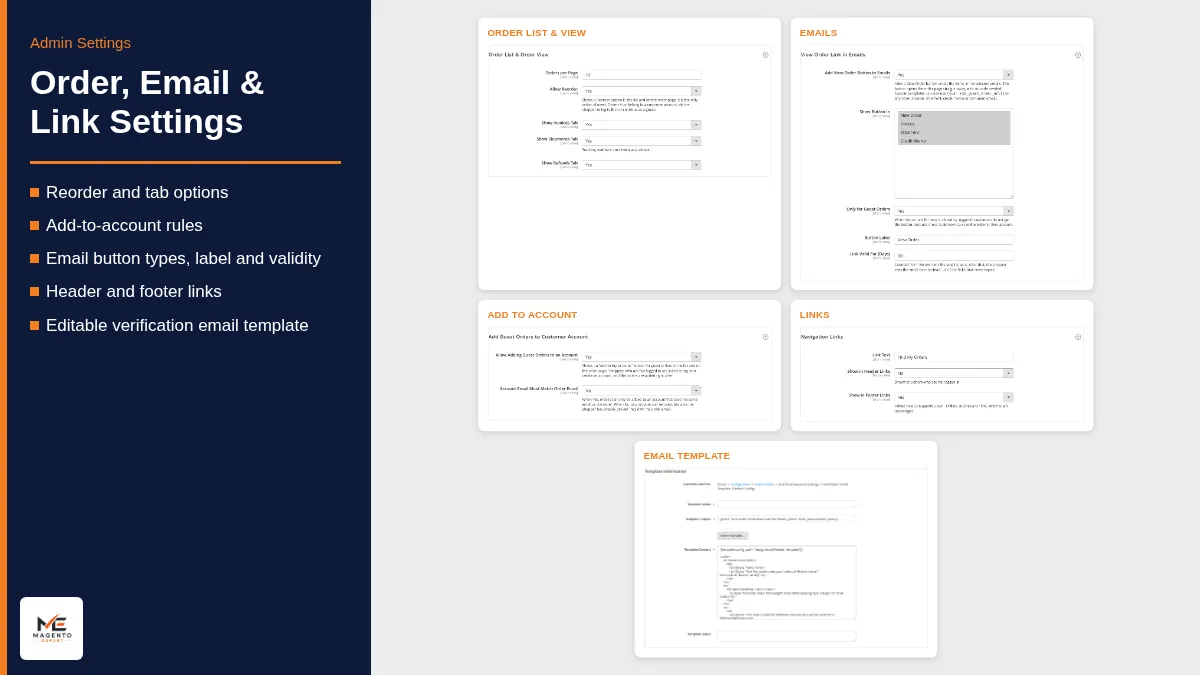
Order List & Order View 5
| Setting | Description |
|---|---|
| Orders per Page | |
| Allow Reorder | Shows a Reorder button in the list and on the order page. It is the only action allowed. Orders that belong to a customer account ask the shopper to log in first or continue as a guest. |
| Show Invoices Tab | |
| Show Shipments Tab | Tracking numbers are shown as plain text. |
| Show Refunds Tab |
Add Guest Orders to Customer Account 2
| Setting | Description |
|---|---|
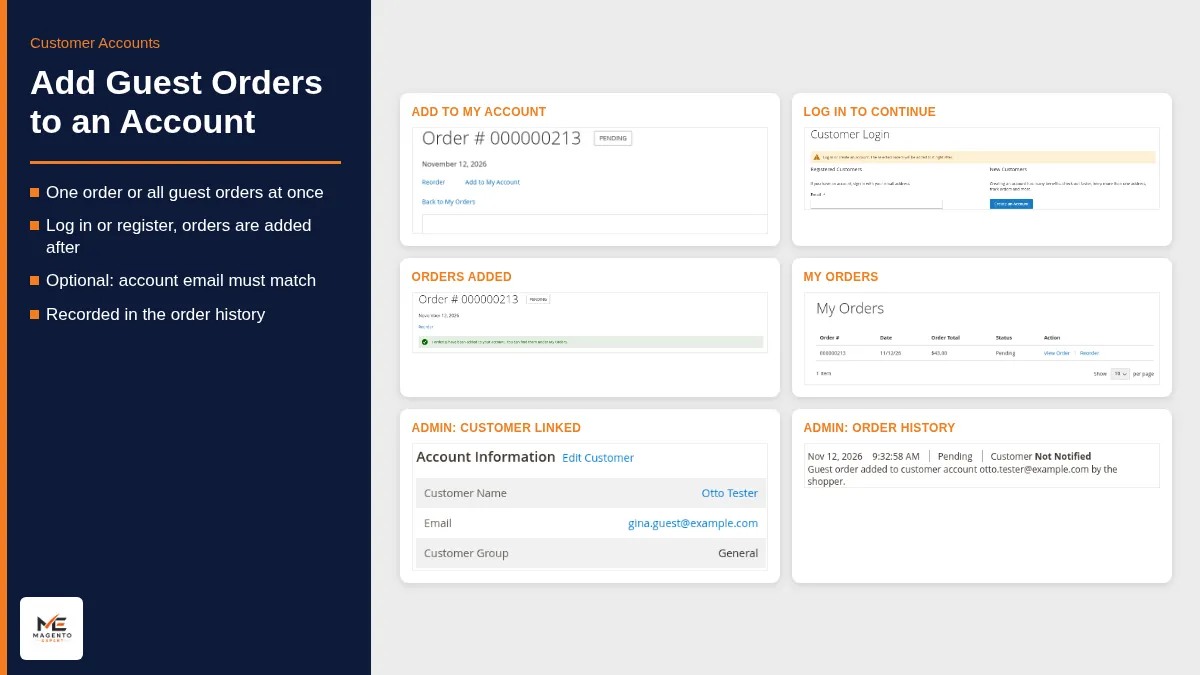
| Allow Adding Guest Orders to an Account | Shows an "Add to My Account" button for guest orders in the list and on the order page. Shoppers who are not logged in are asked to log in or create an account, and the orders are added right after. |
| Account Email Must Match Order Email | When Yes, orders can only be added to an account that uses the same email as the order. When No, any account can be used, because the shopper has already proved they own the order email. |
View Order Link in Emails 5
| Setting | Description |
|---|---|
| Add View Order Button to Emails | Adds a View Order button under the items in the selected emails. The button opens the order page straight away, with no code needed. Custom templates can also use {{var m2e_guest_order_url}} (in any order, invoice, shipment, credit memo or |
| Show Button In | |
| Only for Guest Orders | When Yes, emails for orders placed by logged-in customers do not get the button, because those customers can see the order in their account. |
| Button Label | |
| Link Valid For (Days) | Counted from the moment the email is sent. After that, the shopper sees the email form instead. Use 0 for links that never expire. |
Navigation Links 3
| Setting | Description |
|---|---|
| Link Text | |
| Show in Header Links | Shown to visitors who are not logged in. |
| Show in Footer Links | Added next to Magento's own "Orders and Returns" link, which is left unchanged. |
Developer reference
Cron jobs
| Job | Runs |
|---|---|
mage2expert_guestorders_cleanup | daily at 03:15 (server time) |
Frequently asked questions
How much does Guest Orders cost?
Which Magento and PHP versions are supported?
Where do I configure Guest Orders?
Can I switch it off without uninstalling it?
Can the settings differ per store view?
Does it run background jobs?
Can it be customised for my store?
More Customer & Support
Related extensions
Helpdesk
A complete in-store support ticketing system with departments, agent routing and automatic ticket closing.
Google One Tap Sign In
Let shoppers sign in or register with a single tap of their Google account.
Username
Let customers register and sign in with a username as well as their email address.
Have a Magento project in mind?
Tell me about your store and what you need. I reply to every enquiry within one business day.
Adobe Certified Expert
Adobe Commerce Developer certification, verified on Credly.
15+ years of Magento
From Magento 1 to Magento 2.4.x, Adobe Commerce and Hyvä.
62 Marketplace extensions
Each one reviewed and approved by Adobe.