
Quick Order for Magento 2
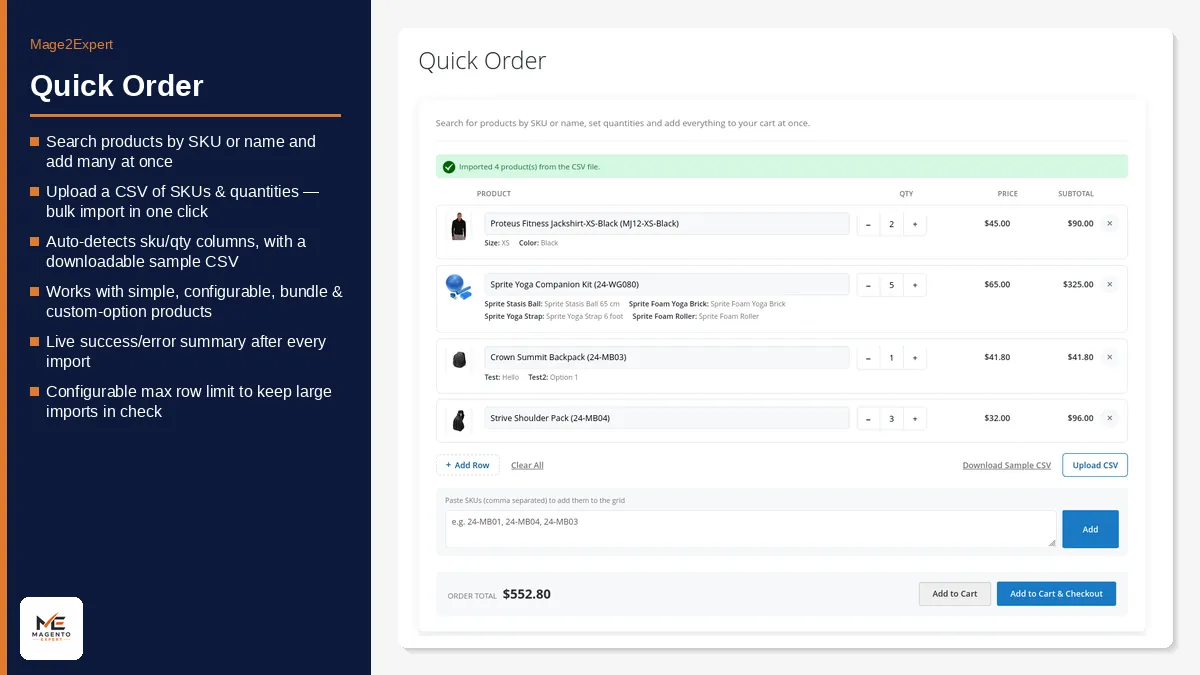
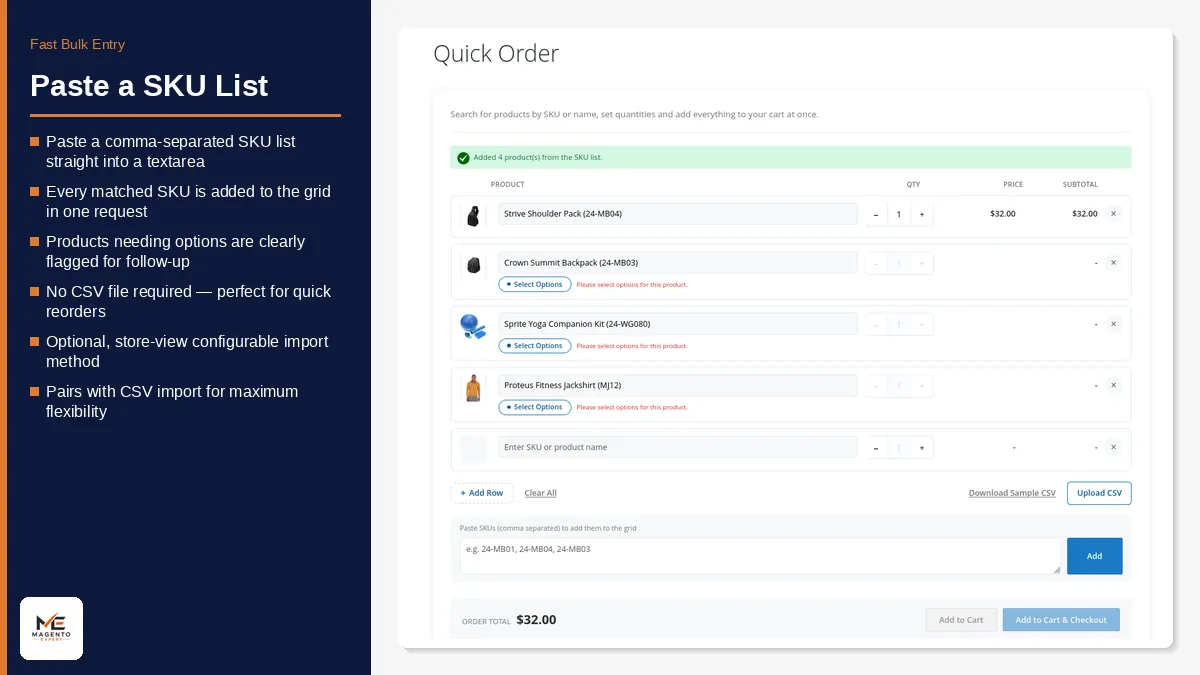
A bulk-ordering page where buyers search by SKU, paste a SKU list or upload a CSV, then add everything to the cart in one click.
Why choose Quick Order?
B2B and repeat buyers already know what they want. Making them browse product pages one by one slows them down. Quick Order gives them a dedicated page to search by SKU or name, paste a list of SKUs or upload a CSV, then add everything to the cart in one click.
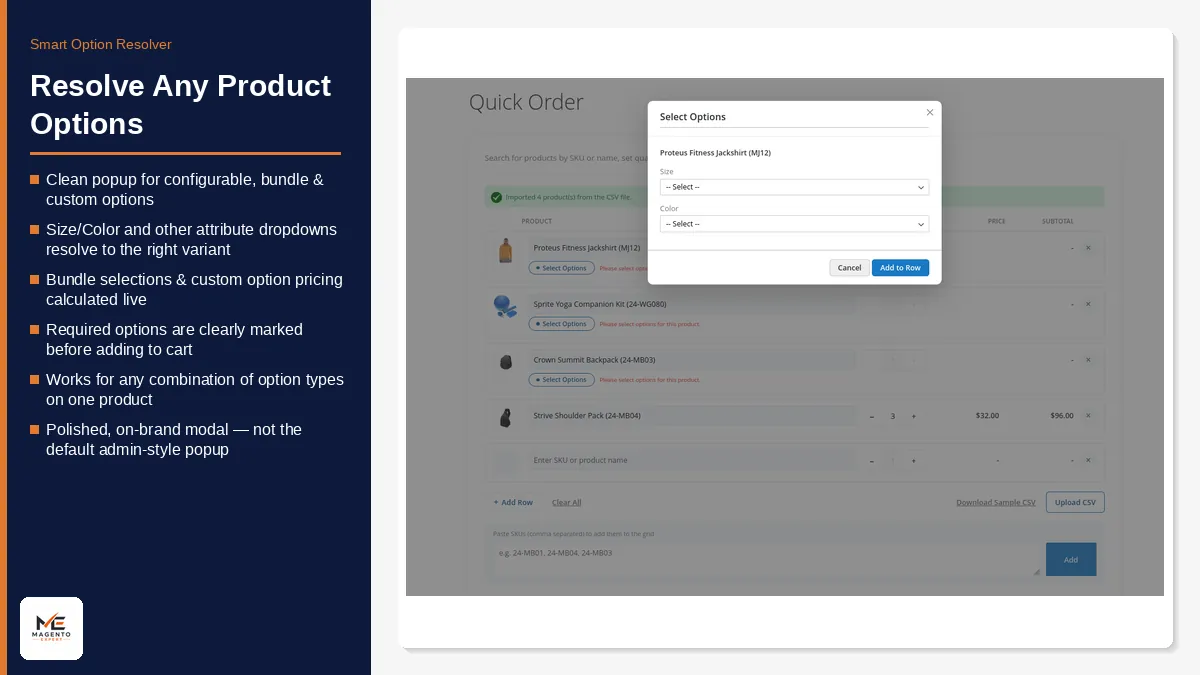
Configurable and bundle options are resolved for each row, prices update live, and you control which customer groups can use it. Best for: B2B, wholesale, replacement-parts and MRO catalogs, and sales teams ordering on behalf of customers.
Key features
- SKU / Name Autocomplete Search
- Paste a SKU List
- CSV Bulk Import
- Universal Option Resolver
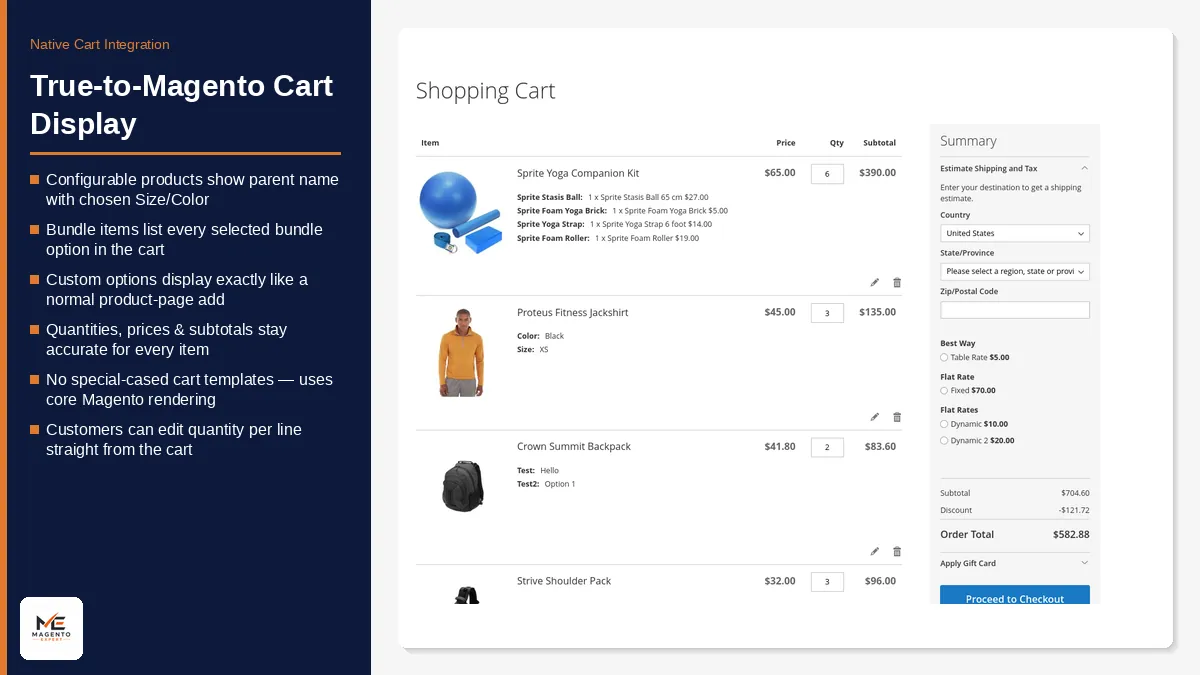
- Native Cart Integration
- Live Pricing Per Row
- Per-Row Quantity Stepper
- Configurable Grid Size
- Flexible Post-Add Redirect
- Guest & Customer Group Access Control
- Configurable Header Link
- Clear Import Feedback
- Enable / Disable Without Uninstalling
- Zero Core Code Modifications
At a glance
| Module name | Mage2Expert_QuickOrder |
|---|---|
| Composer package | mage2expert/module-quick-order |
| Settings | Stores › Configuration › Magento Expert › Quick Order (12 options) |
| Per store view settings | Yes |
| API | No custom endpoints (uses Magento's standard APIs) |
| PHP | 8.1, 8.2, 8.3, 8.4, 8.5 |
Installation
After purchasing on the Adobe Commerce Marketplace, install it with Composer using your Marketplace access keys:
composer require mage2expert/module-quick-order
bin/magento module:enable Mage2Expert_QuickOrder
bin/magento setup:upgrade
bin/magento setup:di:compile
bin/magento setup:static-content:deploy -f
bin/magento cache:flush
Skip setup:di:compile and static-content:deploy if your store runs in developer mode.
Configuration reference
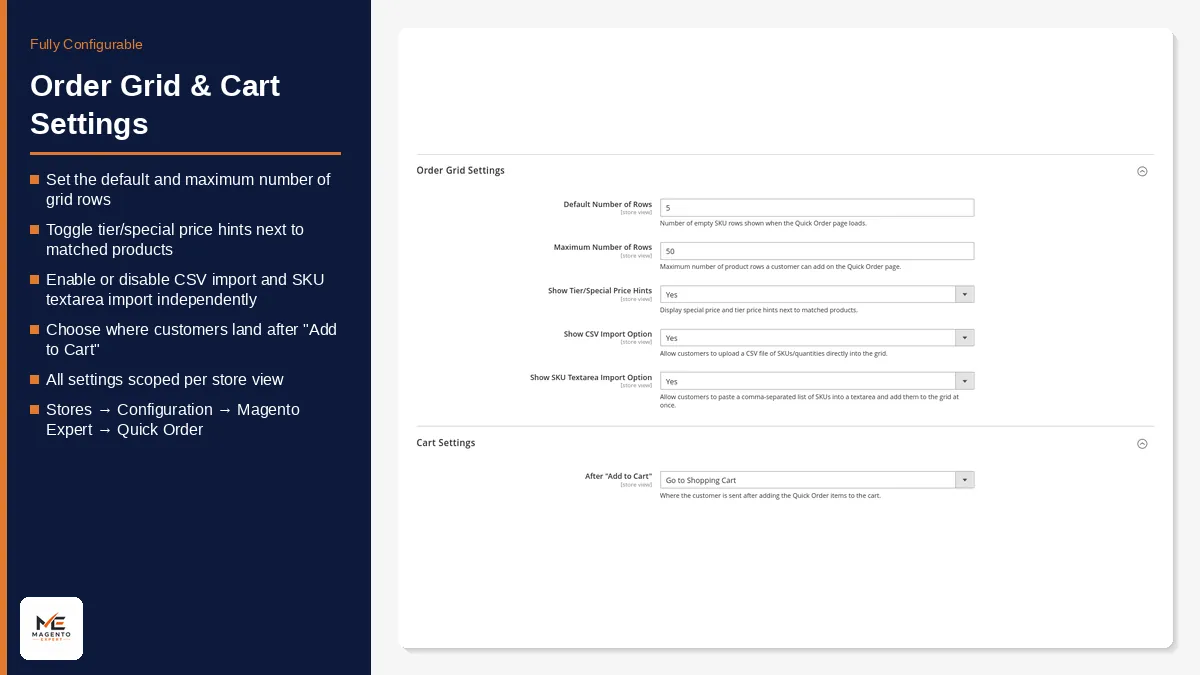
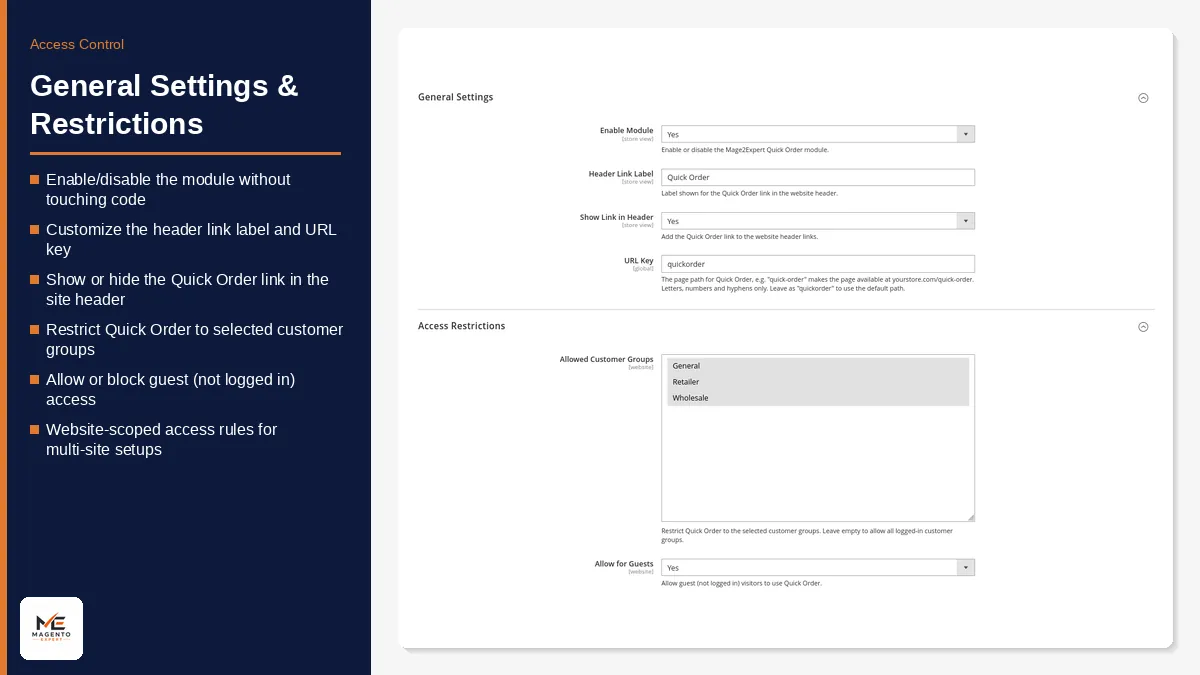
All 12 options under Stores › Configuration › Magento Expert › Quick Order, grouped as they appear in the admin.
General Settings 4
| Setting | Description |
|---|---|
| Enable Module | Enable or disable the Mage2Expert Quick Order module. |
| Header Link Label | Label shown for the Quick Order link in the website header. |
| Show Link in Header | Add the Quick Order link to the website header links. |
| URL Key | The page path for Quick Order, e.g. "quick-order" makes the page available at yourstore.com/quick-order. Letters, numbers and hyphens only. Leave as "quickorder" to use the default path. |
Access Restrictions 2
| Setting | Description |
|---|---|
| Allowed Customer Groups | Restrict Quick Order to the selected customer groups. Leave empty to allow all logged-in customer groups. |
| Allow for Guests | Allow guest (not logged in) visitors to use Quick Order. |
Order Grid Settings 5
| Setting | Description |
|---|---|
| Default Number of Rows | Number of empty SKU rows shown when the Quick Order page loads. |
| Maximum Number of Rows | Maximum number of product rows a customer can add on the Quick Order page. |
| Show Tier/Special Price Hints | Display special price and tier price hints next to matched products. |
| Show CSV Import Option | Allow customers to upload a CSV file of SKUs/quantities directly into the grid. |
| Show SKU Textarea Import Option | Allow customers to paste a comma-separated list of SKUs into a textarea and add them to the grid at once. |
Cart Settings 1
| Setting | Description |
|---|---|
| After "Add to Cart" | Where the customer is sent after adding the Quick Order items to the cart. |
Frequently asked questions
How much does Quick Order cost?
Which Magento and PHP versions are supported?
Where do I configure Quick Order?
Can I switch it off without uninstalling it?
Can the settings differ per store view?
Can it be customised for my store?
More Checkout & Cart
Related extensions
One Step Checkout
A fast, single-page checkout built with Alpine.js, with fewer steps and fewer abandoned carts.
Flat Rates
Offer multiple, conditional flat-rate shipping methods instead of Magento's single fixed-price flat rate.
Matrix Rates
Unlimited table-rate shipping methods priced by destination, post code, weight, price and quantity, with rates imported from CSV.
Have a Magento project in mind?
Tell me about your store and what you need. I reply to every enquiry within one business day.
Adobe Certified Expert
Adobe Commerce Developer certification, verified on Credly.
15+ years of Magento
From Magento 1 to Magento 2.4.x, Adobe Commerce and Hyvä.
62 Marketplace extensions
Each one reviewed and approved by Adobe.