
Ajax Search Autocomplete for Magento 2
Instant search-as-you-type results with products, categories and pages shown in a fast dropdown.
Why choose Ajax Search Autocomplete?
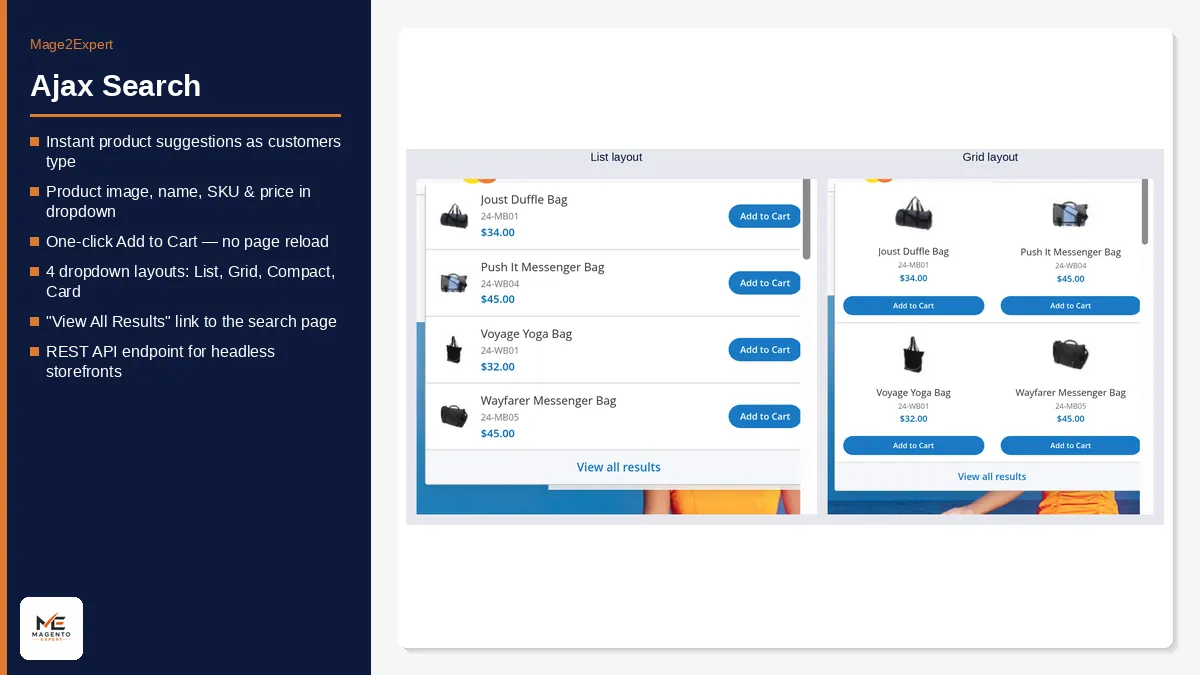
Shoppers who search are some of your most motivated visitors, and a slow or unhelpful search box loses them. Ajax Search Autocomplete shows rich product suggestions with images, accurate prices and one-click Add to Cart as soon as the shopper starts typing.
Choose between list, grid, compact and card layouts, decide which fields are searched, and use the REST endpoint for headless storefronts. Matching works independently of the search index, so results stay reliable. Best for: large catalogs and conversion-focused stores.
Key features
- Instant AJAX Search Suggestions
- Rich Product Rows
- One-Click Add to Cart
- Four Dropdown Layouts
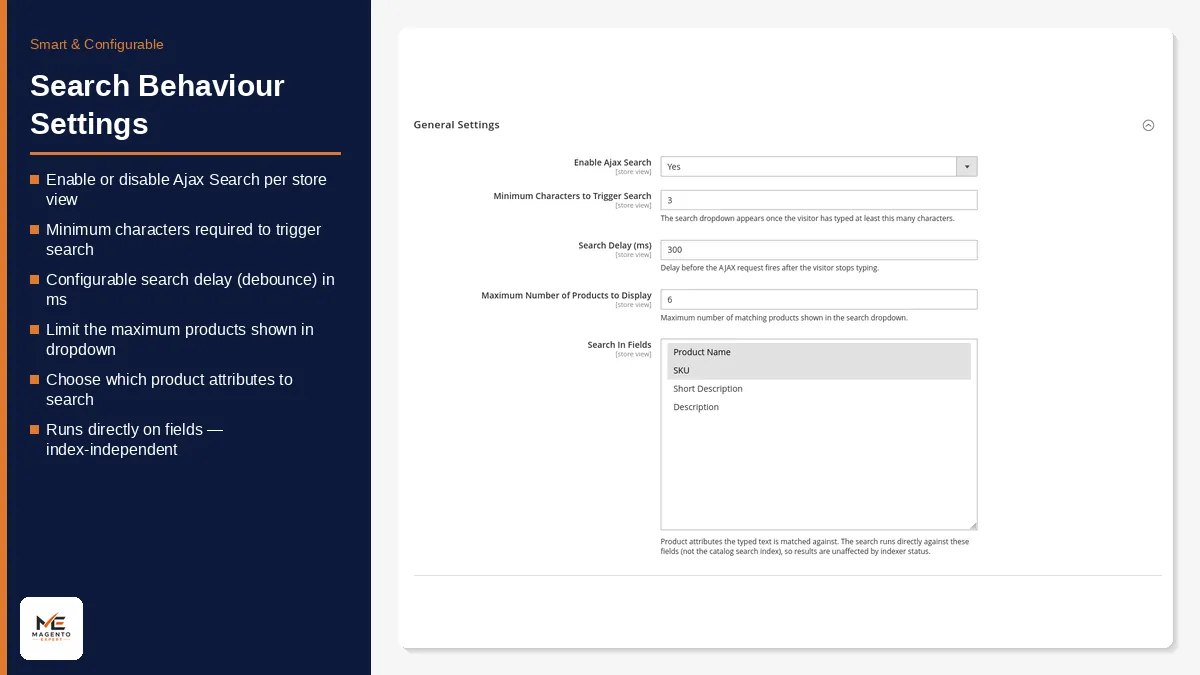
- Configurable Search Fields
- Index-Independent Matching
- Accurate Pricing for Every Product Type
- "View All Results" Link
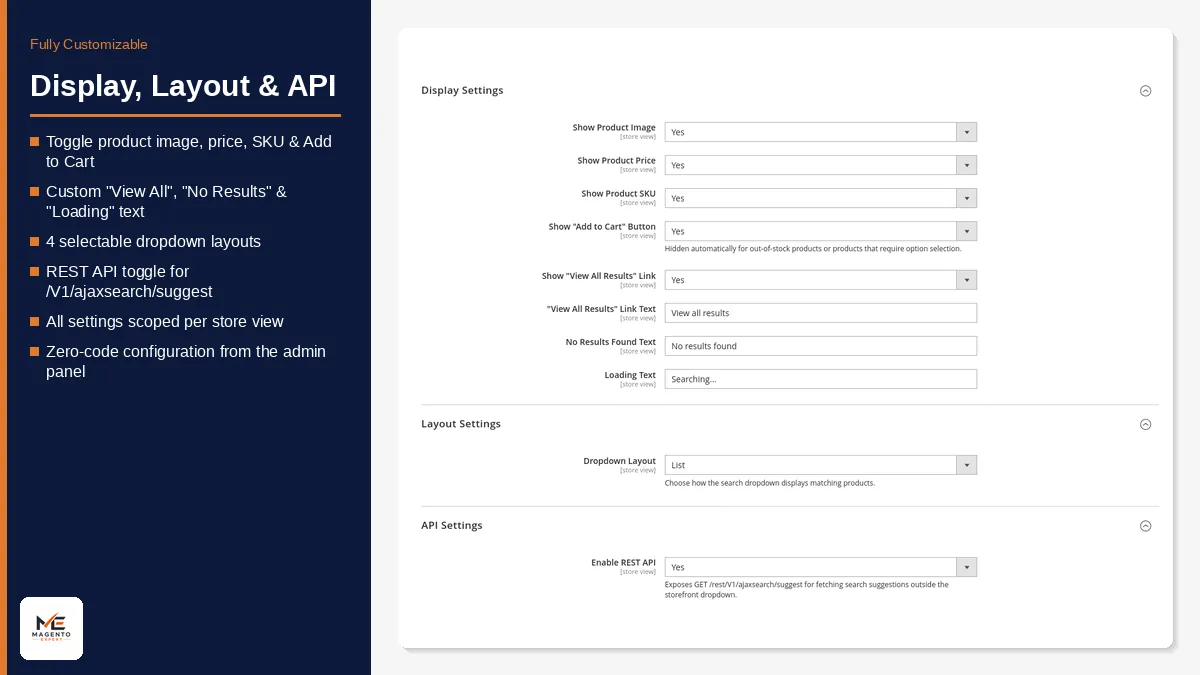
- Custom Dropdown Text
- REST API Endpoint
- Store-View Scope Throughout
- Enable / Disable without Uninstalling
- Zero Core Code Modifications
At a glance
| Module name | Mage2Expert_AjaxSearch |
|---|---|
| Composer package | mage2expert/module-ajax-search |
| Settings | Stores › Configuration › Magento Expert › Ajax Search (15 options) |
| Per store view settings | Yes |
| API | REST: 1 endpoint |
| PHP | 8.1, 8.2, 8.3, 8.4, 8.5 |
Installation
After purchasing on the Adobe Commerce Marketplace, install it with Composer using your Marketplace access keys:
composer require mage2expert/module-ajax-search
bin/magento module:enable Mage2Expert_AjaxSearch
bin/magento setup:upgrade
bin/magento setup:di:compile
bin/magento setup:static-content:deploy -f
bin/magento cache:flush
Skip setup:di:compile and static-content:deploy if your store runs in developer mode.
Configuration reference
All 15 options under Stores › Configuration › Magento Expert › Ajax Search, grouped as they appear in the admin.
General Settings 5
| Setting | Description |
|---|---|
| Enable Ajax Search | |
| Minimum Characters to Trigger Search | The search dropdown appears once the visitor has typed at least this many characters. |
| Search Delay (ms) | Delay before the AJAX request fires after the visitor stops typing. |
| Maximum Number of Products to Display | Maximum number of matching products shown in the search dropdown. |
| Search In Fields | Product attributes the typed text is matched against. The search runs directly against these fields (not the catalog search index), so results are unaffected by indexer status. |
Display Settings 8
| Setting | Description |
|---|---|
| Show Product Image | |
| Show Product Price | |
| Show Product SKU | |
| Show "Add to Cart" Button | Hidden automatically for out-of-stock products or products that require option selection. |
| Show "View All Results" Link | |
| "View All Results" Link Text | |
| No Results Found Text | |
| Loading Text |
Layout Settings 1
| Setting | Description |
|---|---|
| Dropdown Layout | Choose how the search dropdown displays matching products. |
API Settings 1
| Setting | Description |
|---|---|
| Enable REST API | Exposes GET /rest/V1/ajaxsearch/suggest for fetching search suggestions outside the storefront dropdown. |
Developer reference
REST API
| Method | Endpoint |
|---|---|
GET | /rest/V1/ajaxsearch/suggest |
Frequently asked questions
How much does Ajax Search Autocomplete cost?
Which Magento and PHP versions are supported?
Where do I configure Ajax Search Autocomplete?
Can I switch it off without uninstalling it?
Can the settings differ per store view?
Does it have an API?
Can it be customised for my store?
More Catalog & Storefront
Related extensions
360 Product View
Turn a series of ordinary product photos into an interactive 360° view, so shoppers can turn the product around before they buy.
Product Labels
Rule-based text or image badges such as “New” or “Sale” on product images, everywhere they appear in your store.
Hide Price
Hide prices and Add to Cart for guests or chosen customer groups and show a “Call for Price” button instead.
Have a Magento project in mind?
Tell me about your store and what you need. I reply to every enquiry within one business day.
Adobe Certified Expert
Adobe Commerce Developer certification, verified on Credly.
15+ years of Magento
From Magento 1 to Magento 2.4.x, Adobe Commerce and Hyvä.
62 Marketplace extensions
Each one reviewed and approved by Adobe.