One Step Checkout for Magento 2
A fast, single-page checkout built with Alpine.js, with fewer steps and fewer abandoned carts.
Why choose One Step Checkout?
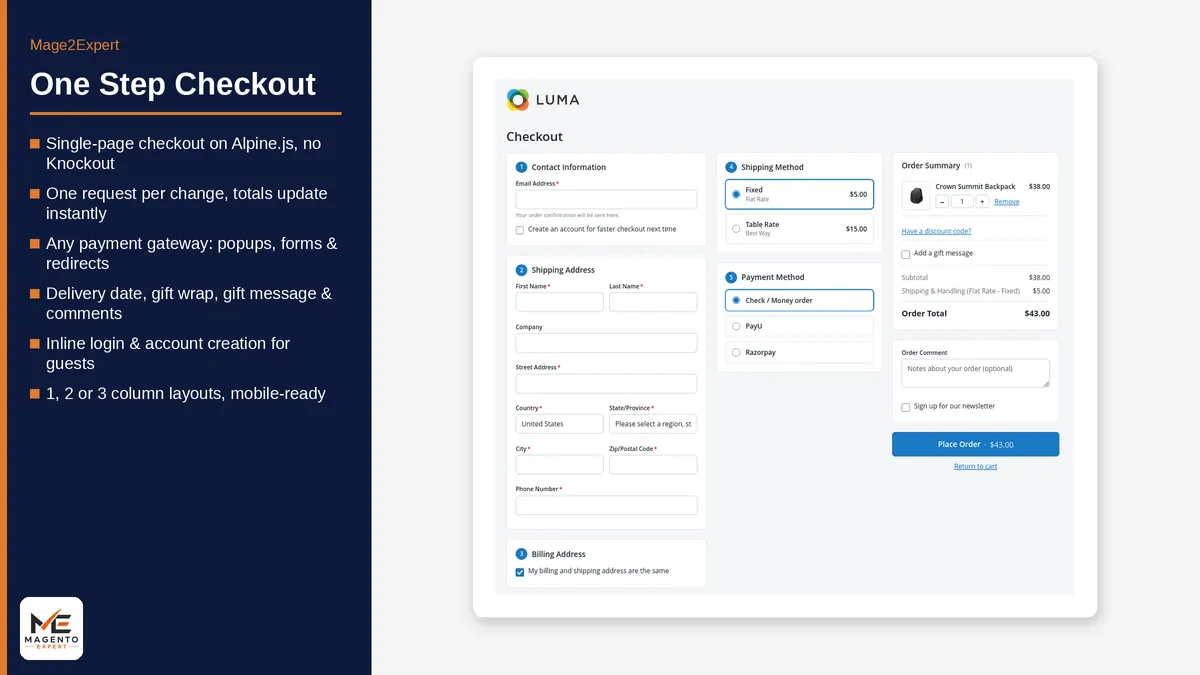
Every extra step between the cart and the "Place Order" button is a chance for a shopper to give up. One Step Checkout puts contact details, addresses, shipping, delivery date, gift options and payment on a single screen, and it is built on lightweight Alpine.js rather than Magento's heavy Knockout checkout, so it is usable the moment it loads, even on a slow mobile connection.
It also keeps working with the payment gateways you already use, including popup and redirect gateways such as Razorpay, PayU, Stripe and PayPal, and a single switch brings back the standard Magento checkout at any time. Best for: stores that want to cut cart abandonment, especially on mobile.
Key features
- True Single-Page Checkout
- Lightweight Alpine.js Storefront
- One Request per Change
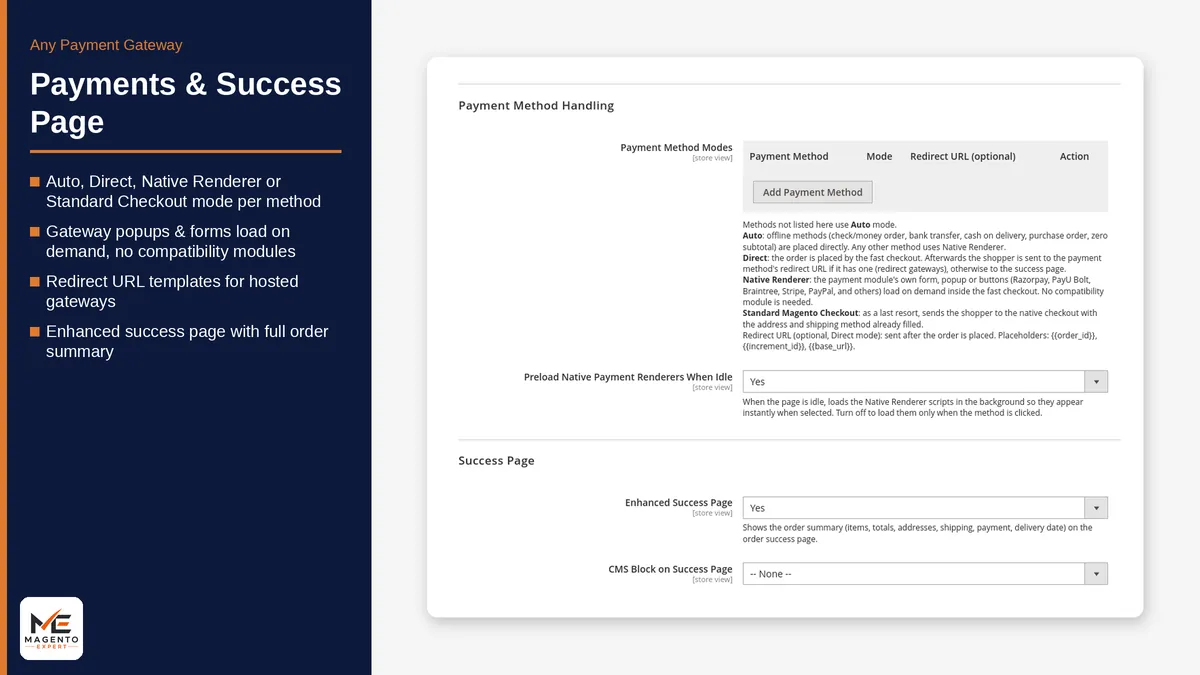
- Works with Any Payment Gateway
- Flexible Payment Handling Modes
- Delivery Date and Time Slots
- Gift Wrap and Gift Message
- Checkout Fields Manager
- Additional Order Fields
- Inline Login and Account Creation
- Google Address Autocomplete and Geolocation
- Editable Order Summary
- Design and Layout Options
- Enhanced Success Page
At a glance
| Module name | Mage2Expert_OneStepCheckout |
|---|---|
| Composer package | mage2expert/module-one-step-checkout |
| Settings | Stores › Configuration › Mage2Expert › One Step Checkout (61 options) |
| Per store view settings | Yes |
| API | No custom endpoints (uses Magento's standard APIs) |
| PHP | 8.1, 8.2, 8.3, 8.4, 8.5 |
Installation
After purchasing on the Adobe Commerce Marketplace, install it with Composer using your Marketplace access keys:
composer require mage2expert/module-one-step-checkout
bin/magento module:enable Mage2Expert_OneStepCheckout
bin/magento setup:upgrade
bin/magento setup:di:compile
bin/magento setup:static-content:deploy -f
bin/magento cache:flush
Skip setup:di:compile and static-content:deploy if your store runs in developer mode.
Configuration reference
All 61 options under Stores › Configuration › Mage2Expert › One Step Checkout, grouped as they appear in the admin.
General Settings 16
| Setting | Description |
|---|---|
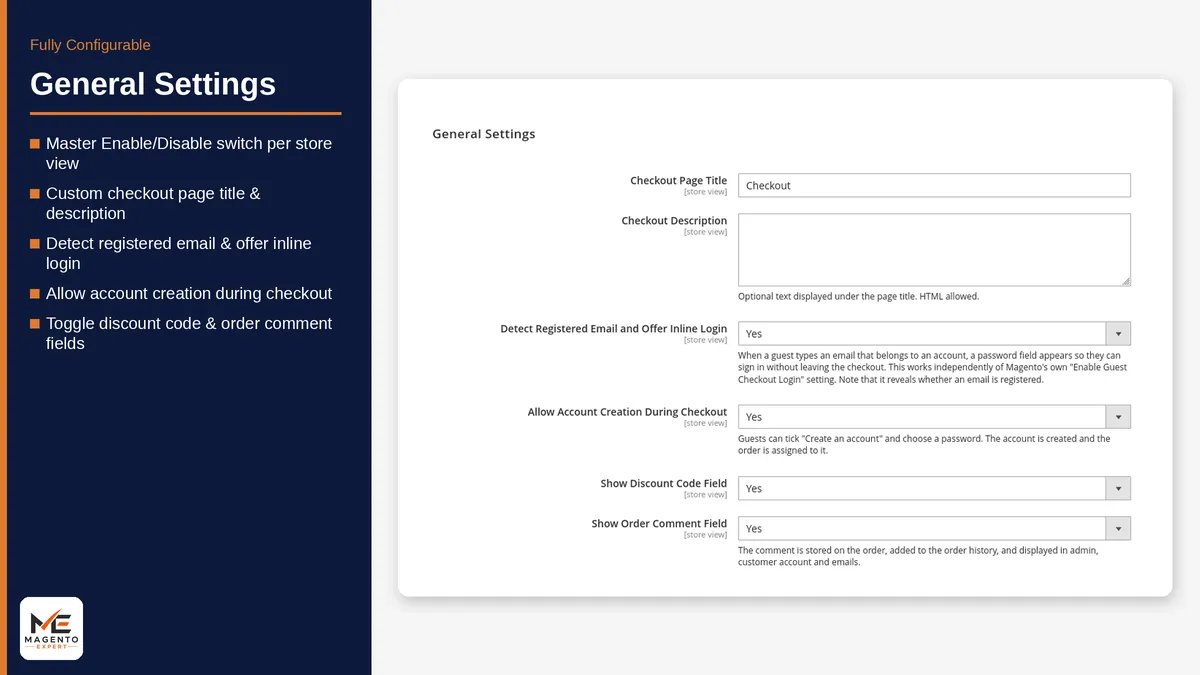
| Enable One Step Checkout | When enabled, /checkout is replaced by the fast Alpine.js one step checkout. When disabled, the native Magento checkout is used and none of the features below apply. |
| Checkout Page Title | |
| Checkout Description | Optional text displayed under the page title. HTML allowed. |
| Detect Registered Email and Offer Inline Login | When a guest types an email that belongs to an account, a password field appears so they can sign in without leaving the checkout. This works independently of Magento's own "Enable Guest Checkout Login" setting. Note that it reveals whether |
| Allow Account Creation During Checkout | Guests can tick "Create an account" and choose a password. The account is created and the order is assigned to it. |
| Show Discount Code Field | |
| Show Order Comment Field | The comment is stored on the order, added to the order history, and displayed in admin, customer account and emails. |
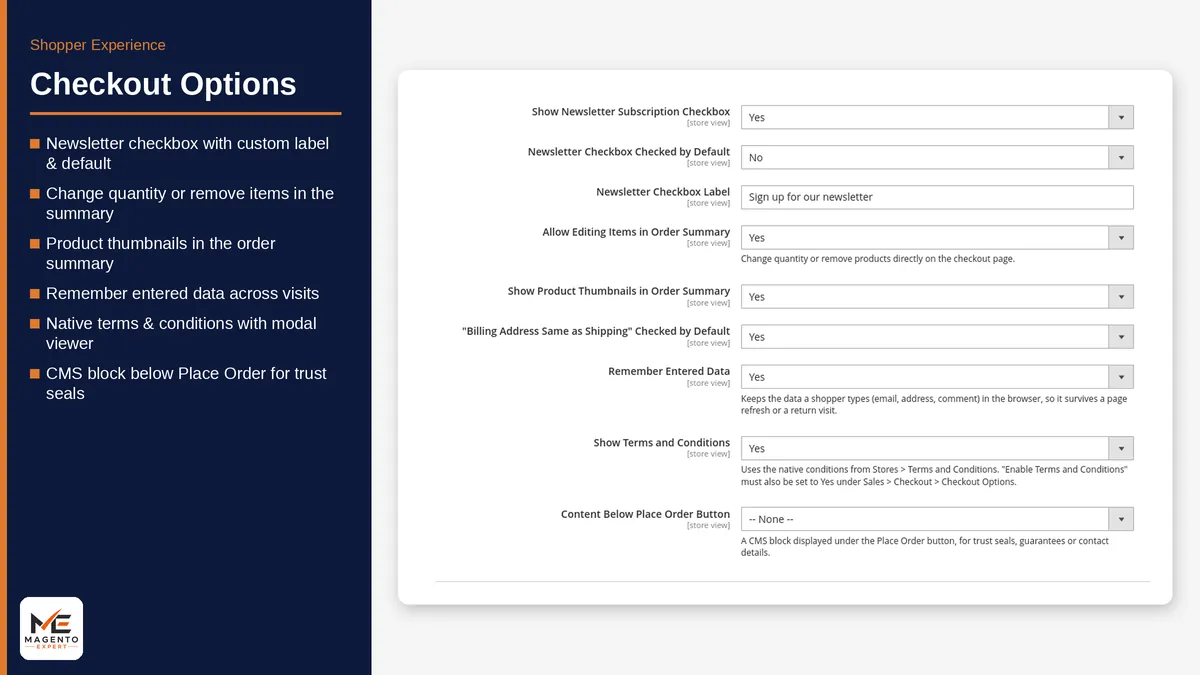
| Show Newsletter Subscription Checkbox | |
| Newsletter Checkbox Checked by Default | |
| Newsletter Checkbox Label | |
| Allow Editing Items in Order Summary | Change quantity or remove products directly on the checkout page. |
| Show Product Thumbnails in Order Summary | |
| "Billing Address Same as Shipping" Checked by Default | |
| Remember Entered Data | Keeps the data a shopper types (email, address, comment) in the browser, so it survives a page refresh or a return visit. |
| Show Terms and Conditions | Uses the native conditions from Stores > Terms and Conditions. "Enable Terms and Conditions" must also be set to Yes under Sales > Checkout > Checkout Options. |
| Content Below Place Order Button | A CMS block displayed under the Place Order button, for trust seals, guarantees or contact details. |
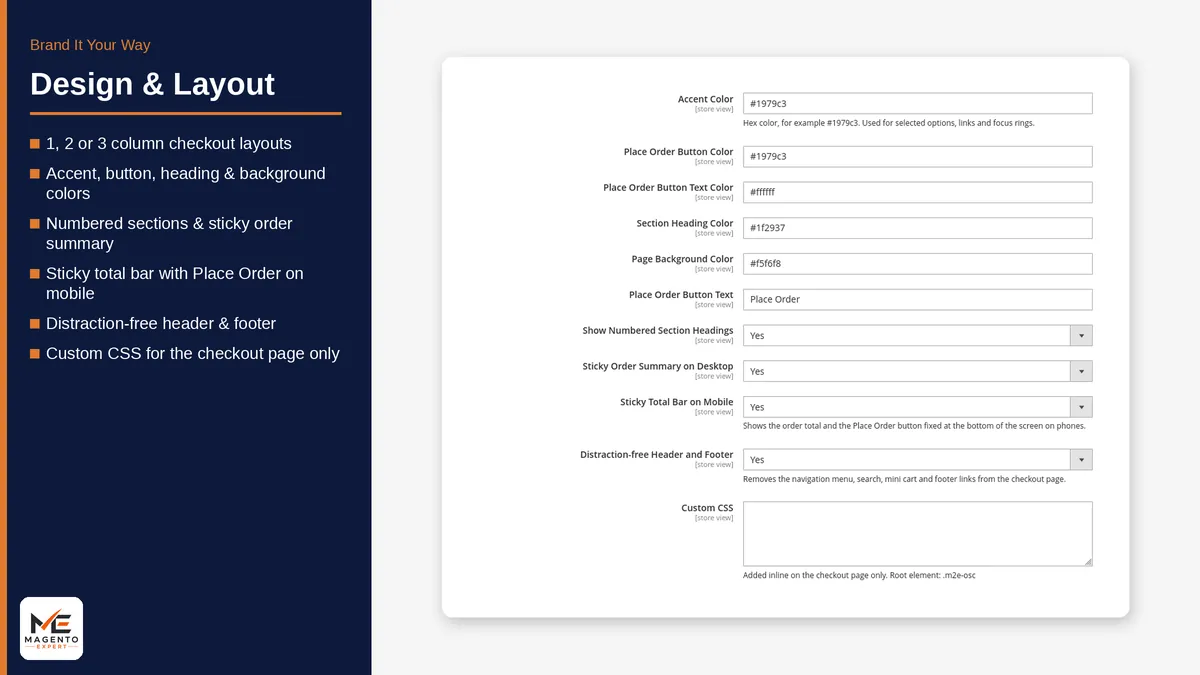
Design 12
| Setting | Description |
|---|---|
| Checkout Layout | All layouts collapse to a single column on mobile. |
| Accent Color | Hex color, for example #1979c3. Used for selected options, links and focus rings. |
| Place Order Button Color | |
| Place Order Button Text Color | |
| Section Heading Color | |
| Page Background Color | |
| Place Order Button Text | |
| Show Numbered Section Headings | |
| Sticky Order Summary on Desktop | |
| Sticky Total Bar on Mobile | Shows the order total and the Place Order button fixed at the bottom of the screen on phones. |
| Distraction-free Header and Footer | Removes the navigation menu, search, mini cart and footer links from the checkout page. |
| Custom CSS | Added inline on the checkout page only. Root element: .m2e-osc |
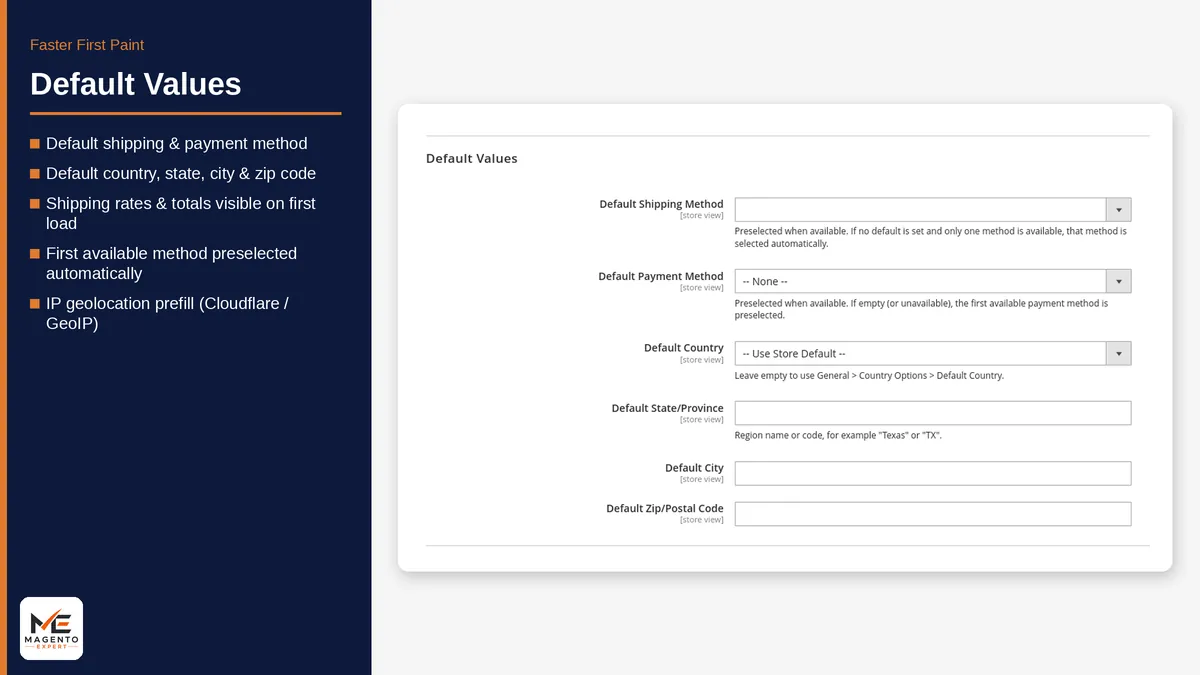
Default Values 6
| Setting | Description |
|---|---|
| Default Shipping Method | Preselected when available. If no default is set and only one method is available, that method is selected automatically. |
| Default Payment Method | Preselected when available. If empty (or unavailable), the first available payment method is preselected. |
| Default Country | Leave empty to use General > Country Options > Default Country. |
| Default State/Province | Region name or code, for example "Texas" or "TX". |
| Default City | |
| Default Zip/Postal Code |
Geolocation 2
| Setting | Description |
|---|---|
| Prefill Country/City by Visitor IP | Detects the visitor's country (and city where available) and prefills an empty address so shipping rates show immediately. |
| Geolocation Source | "Server headers" reads the country from CDN or web server headers (Cloudflare CF-IPCountry, GeoIP module variables), with no external requests. "ipapi.co" makes a server-side lookup per new visitor and caches it; check that this suits your |
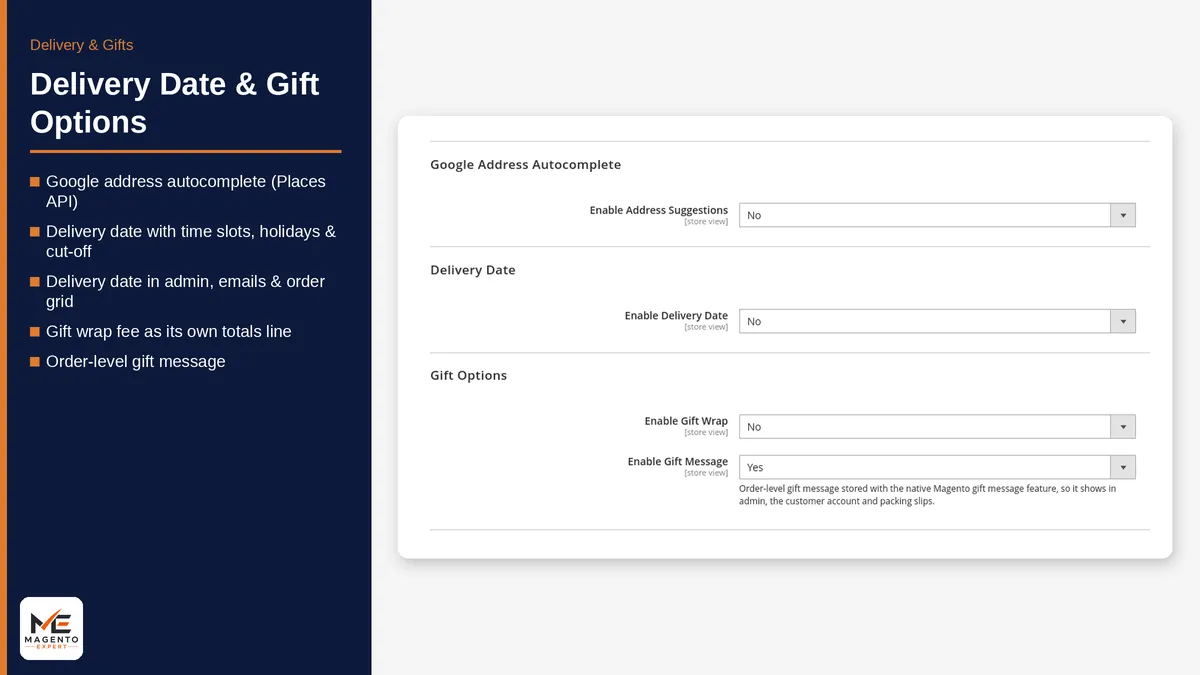
Google Address Autocomplete 3
| Setting | Description |
|---|---|
| Enable Address Suggestions | |
| Google Maps API Key | Browser key with the "Places API" enabled. Restrict it to your domain in Google Cloud Console. The Google script loads only when the shopper focuses the street field. |
| Restrict Suggestions to Selected Country |
Delivery Date 11
| Setting | Description |
|---|---|
| Enable Delivery Date | |
| Delivery Date is Required | |
| Minimum Lead Time (Days) | 0 allows same-day delivery. |
| Maximum Days Ahead | |
| Same Day Cut-off Time | 24h format HH:MM in the store timezone. Orders placed after this time add one extra day of lead time. Leave empty to disable. |
| No Delivery On | |
| Holidays / Blocked Dates | One date per line as YYYY-MM-DD, or MM-DD for a date that repeats every year (for example 12-25). |
| Enable Delivery Time Slots | |
| Time Slots | One per line, for example "09:00-12:00". Same-day slots that have already started are hidden. |
| Enable Delivery Instructions Field | |
| Show Only for Shipping Methods | Leave empty to show for every shipping method. Not shown for virtual orders. |
Gift Options 5
| Setting | Description |
|---|---|
| Enable Gift Wrap | |
| Gift Wrap Label | |
| Gift Wrap Fee | Per order, in the website base currency. Displayed as its own totals line on the order, invoice and credit memo. |
| Gift Wrap Fee Calculation | |
| Enable Gift Message | Order-level gift message stored with the native Magento gift message feature, so it shows in admin, the customer account and packing slips. |
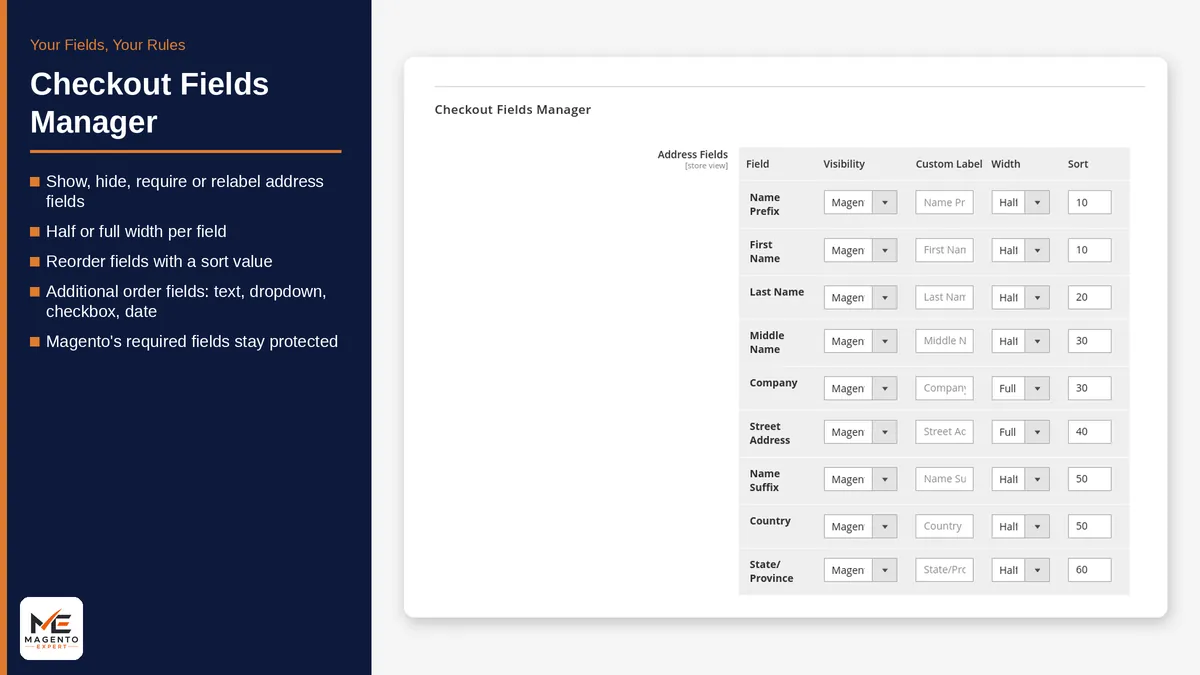
Checkout Fields Manager 2
| Setting | Description |
|---|---|
| Address Fields | Change the label, visibility, required flag, width and order of each address field. Magento still applies its own rules, so a field that Magento itself requires (Customers > Customer Configuration > Name and Address Options) cannot be made |
| Additional Order Fields | Extra fields shown in the "Additional Information" section and saved on the order. Types: text, textarea, select, checkbox, date. For select, enter options separated by "|". Values are shown in admin, customer account and emails. |
Payment Method Handling 2
| Setting | Description |
|---|---|
| Payment Method Modes | Methods not listed here use Auto mode. Auto : offline methods (check/money order, bank transfer, cash on delivery, purchase order, zero subtotal) are placed directly. Any other method uses Native Renderer. Direct : the order is placed by th |
| Preload Native Payment Renderers When Idle | When the page is idle, loads the Native Renderer scripts in the background so they appear instantly when selected. Turn off to load them only when the method is clicked. |
Success Page 2
| Setting | Description |
|---|---|
| Enhanced Success Page | Shows the order summary (items, totals, addresses, shipping, payment, delivery date) on the order success page. |
| CMS Block on Success Page |
Frequently asked questions
How much does One Step Checkout cost?
Which Magento and PHP versions are supported?
Where do I configure One Step Checkout?
Can I switch it off without uninstalling it?
Can the settings differ per store view?
Can it be customised for my store?
More Checkout & Cart
Related extensions
Quick Order
A bulk-ordering page where buyers search by SKU, paste a SKU list or upload a CSV, then add everything to the cart in one click.
Flat Rates
Offer multiple, conditional flat-rate shipping methods instead of Magento's single fixed-price flat rate.
Matrix Rates
Unlimited table-rate shipping methods priced by destination, post code, weight, price and quantity, with rates imported from CSV.
Have a Magento project in mind?
Tell me about your store and what you need. I reply to every enquiry within one business day.
Adobe Certified Expert
Adobe Commerce Developer certification, verified on Credly.
15+ years of Magento
From Magento 1 to Magento 2.4.x, Adobe Commerce and Hyvä.
62 Marketplace extensions
Each one reviewed and approved by Adobe.